


Easy Events makes it simple to host, manage, and promote events directly inside your Bettermode community — no external tools required. Instead of juggling third-party platforms for event listings and RSVPs, you can create a seamless experience where discovery, registration, and follow-up all happen in one place.
To get started, you'll need to enable the Easy Events template by adding it as a new space in your community.
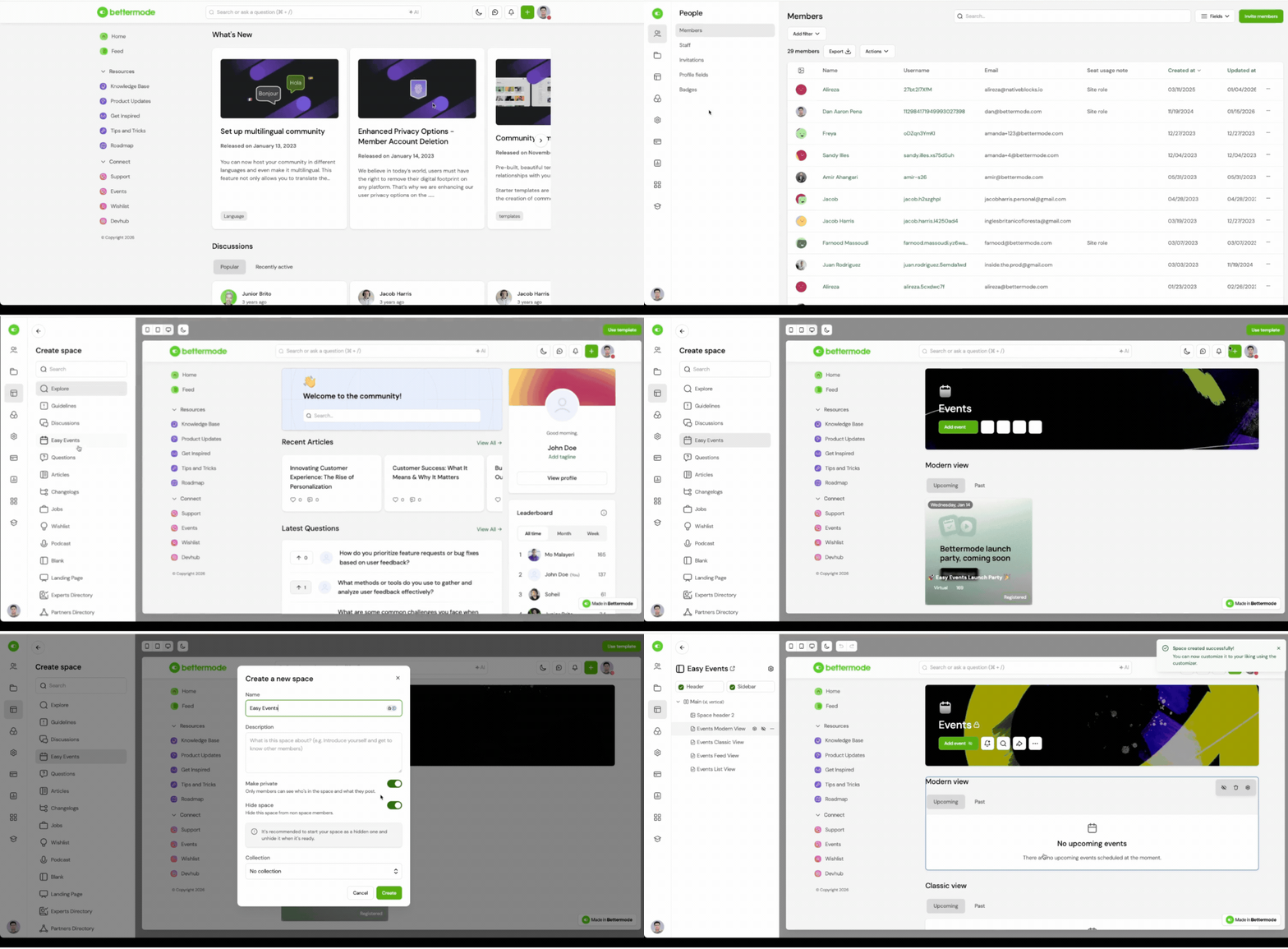
How to Enable Easy Events:
Go to Menu > Administration > Design Studio > Collections and Spaces.
Click + Add Space to create a new space.
Scroll to the bottom of the template list and select Easy Events.
Give your space a name like “Events,” “Workshops,” or “Community Meetups.”
Click Create to activate the Events space in your community.
Once enabled, the space will include a pre-configured layout optimized for event management — including event cards, RSVP tracking, calendar integration, and built-in analytics.
Key Features:
Pre-built space designed specifically for events
Embedded support for RSVP, recurring dates, and time zone control
Flexible layout views: Card, List, or Feed
AI search indexing and calendar integration
Connected analytics and member-level RSVP tracking
Benefits:
Eliminate the need for external tools like Eventbrite or Luma
Offer members a fully native registration and follow-up experience
Centralize event discovery, reminders, and post-event engagement
Save time by using a ready-made event model with built-in fields
Practical Use Cases / Best Practices:
Create a dedicated “Events” or “Webinars” space in your top-level navigation
Use different collections if you want to segment internal vs. external events
Keep past events visible for reference or turn them off from the block settings
Enable calendar sync and reminders to increase attendance
Already Using a CMS-Based Events Space?
If you’ve previously built an Events space using a custom CMS Model, you can continue using it — nothing will break. However, we recommend switching to the new Easy Events template to take advantage of:
Built-in RSVP and calendar sync
Recurring event scheduling
Location detection (with maps or virtual links)
Automatic event reminders and follow-up notifications
Simplified layout and event-specific analytics
How to Transition:
Go to Design Studio and create a new space using the Easy Events template.
Keep your old space live during the transition if needed.
Recreate upcoming events manually using the new model (posts cannot be migrated automatically).
Update navigation and links to point to your new Events space.
Archive or hide the legacy space when you're ready.
You can run both in parallel for as long as needed. We recommend using Easy Events for all new events going forward.
FAQs / Troubleshooting:
Q: Can Space Admins create events, or is it just staff/admins?
A: Yes, Space Admins can create events in the spaces they manage, just like site admins.
Q: What's the maximum capacity of an event?
A: There is no hardcoded limit, but you can manually set a capacity when creating an event. Once the limit is reached, RSVPs will be closed.
Q: We have a conference with events that span two days. How would this be handled?
A: You can create a single event with a two-day date range or create separate events for each day or session, depending on how you want to manage RSVPs.
Q: Do I need to create a meeting link for virtual events?
A: Yes. Bettermode does not generate meeting links. You should create one using your preferred platform and paste it into the event.
Related Articles:
