Customer feedback tools: the categories, how to choose, and the one we run ourselves

I have bought, ripped out, and rebuilt more customer feedback tools than I would like to admit. Survey tools, idea boards, a social listening platform nobody logged into after month two. Here is what all that trial and error taught me: the tool is the easy part. The hard part is picking one your customers will actually use and then doing something with what they tell you. This guide is the version I wish someone had handed me, the categories of customer feedback tools that exist, how to choose between them without drowning in feature lists, and what we run at Bettermode on our own product.
What a customer feedback tool actually does
A customer feedback tool collects the customer feedback your customers give you, organizes it so you can see patterns, and routes it to whoever can act. That is the whole job. Most customer feedback tools do one slice of it brilliantly and the rest poorly, which is why most teams end up running a few of them side by side.
The reason any of this matters is that companies are reliably wrong about their own product. The often-cited Bain study found 80% of firms believed they delivered a superior experience while 8% of their customers agreed. A customer feedback tool exists to close that gap, to replace what you assume customers think with the customer feedback they actually give you. Get it right and you collect feedback continuously instead of guessing between quarterly surveys, and customer satisfaction stops being something you hope for and becomes something you measure.
The main types of customer feedback tools
No single category of customer feedback tools covers everything, so it helps to know what each one is for before you go shopping. Here is how I sort the customer feedback tools I have actually used.
Community and feedback boards
A community platform gives customers one place to post ideas, vote on each other's, ask questions, and watch what you ship. This is the category I lean on hardest, because it captures customer feedback in context: you see not just what someone wants, but how many others want it and why. The voting quietly turns raw customer feedback into ranked customer insights, no spreadsheet required. Feature-request boards turn a private backlog into a public queue customers can track, and the feature request management happens in the open. It is also the only category on this list that deflects support tickets while it gathers customer insights.
Surveys and microsurveys
NPS, CSAT, and customer effort score are the workhorses, and the lightweight in-app widgets (think a one-question popup after a feature launch) are their faster cousins. They collect feedback at a single moment, which makes them great for trends and for benchmarking customer satisfaction over time. They are weak on the why, so treat the score as the headline and the open-text box as the actual story.
Reviews and ratings
G2, Trustpilot, and the app stores collect feedback you never had to ask for, with the bonus that it is public and comparative. Read them in aggregate for the pattern, and read your competitors' reviews while you are there, because that is a free roadmap of where the category is failing people.
Support and conversation intelligence
Your help desk already documents every point of friction, and conversation intelligence tools mine your calls, chats, and tickets at scale for recurring themes. This is the fastest way to learn what is broken today. It is reactive by nature, so pair it with something forward-looking.
Product analytics and social listening
Analytics tools (heatmaps, session recordings, event tracking) show you feedback through behavior rather than words, which is useful when customers struggle but do not bother to tell you. Social listening catches the conversations happening about you when you are not in the room. Neither is explicit customer feedback, but both fill in blind spots the other categories miss, which is the real argument for a multi channel approach rather than betting everything on one source.
How to choose without drowning in feature lists
Every vendor will hand you a checklist of forty features. Most of them do not matter. After enough of these evaluations, I narrowed it to four questions that actually predict whether a tool will work.
- Where do your customers already talk? The best tool is the one that meets them where they are. A beautiful platform nobody opens collects nothing.
- Does it close the loop? If a tool can capture a request but cannot show the customer what happened to it, it is a suggestion box, not a feedback system. Closing the loop is what keeps people contributing.
- Will it connect to your stack? Feedback that lands next to your CRM, support, and product data is worth far more than feedback stranded in its own silo. I have wired tools together with Zapier at midnight to fix exactly this, so save yourself the trouble and check the integrations up front.
- Who owns it on Monday? Multi channel feedback collection is only as good as the person accountable for reading it. Pick the tool that fits your team's actual capacity, not the one with the most dashboards.
Budget, security, and reporting matter too, but they rarely decide the outcome. These four do.
What we run at Bettermode, and yes, we dogfood it
I would not recommend a category I do not use myself, so here is ours. Bettermode runs its own product feedback inside a Bettermode community, on a public Wishlist board where customers post ideas and everyone else upvotes them.
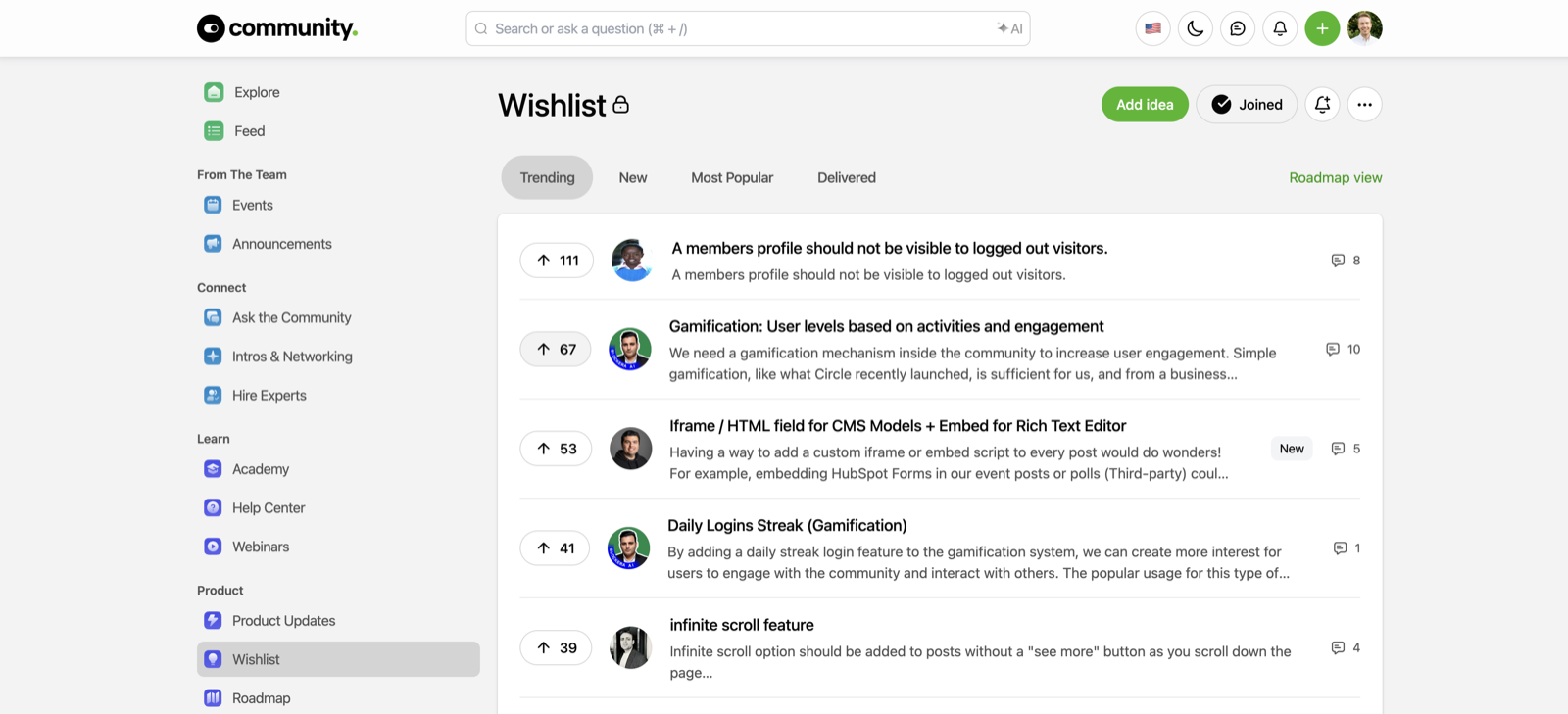
A few things I love about running it this way. The votes do the prioritizing for us, so the loudest request is not automatically the most important one, the most-wanted one is. The "Delivered" tab is the part most tools skip: it is a public record of ideas we shipped, which is closing the loop turned into a feature. And because it sits next to our Q&A, product updates, and roadmap, a customer can go from "here is my idea" to "I can see you built it" without leaving the community. That is the difference between collecting customer feedback and running on it, and it is what a healthy feedback loop looks like once it is working.
This is the same setup our customers use. Xano, Lenovo, and others run their feature requests and product feedback on Bettermode for the same reason: the feedback, the votes, and the resolution all live in one place.
Making feedback actionable
Collecting feedback is the easy 20%. Acting on it is the rest. Whatever customer feedback tools you pick, the workflow that makes them pay off looks the same: tag every piece of customer feedback by theme so patterns and customer insights surface, route each theme to the team that can act, track status so nothing rots in a backlog, and close the feedback loop by telling customers what changed because of them. That last step is the one teams skip and the one that earns you the next round of honest feedback.
If you want the discipline behind all of this, not just the tooling, we wrote a full voice of the customer guide. And if you would rather compare named vendors side by side, our voice of the customer software roundup does exactly that. This guide is about the categories and the choice; those two go deeper on the practice and the products.
TL;DR
- Customer feedback tools collect what customers tell you, organize it, and route it to action. The tool is the easy part; using it is the job.
- The categories: community and feedback boards (continuous, in-context, closes the loop), surveys (trends), reviews (public and comparative), support and conversation intelligence (what is broken now), and analytics plus social listening (the blind spots).
- Choose on four questions: where your customers already talk, whether it closes the loop, whether it connects to your stack, and who owns it on Monday. Ignore the forty-feature checklist.
- We dogfood the community category: Bettermode runs its own Wishlist board, where votes prioritize and a public Delivered tab proves the loop is closed.
- Pick the tool that fits where your customers already are, then actually act on what they say. Bain found 80% of companies think they deliver a great experience and 8% of customers agree; the tool is how you close that gap.
FAQ
What is a customer feedback tool?
A customer feedback tool gathers feedback from one or more channels (surveys, reviews, community discussions, support tickets, behavior), organizes it, and helps you act on it. Some cover a single channel well; most teams combine a few to see the whole picture.
What is the difference between a survey tool and a community feedback board?
A survey tool is best for structured feedback at a specific moment, like satisfaction after a purchase or an NPS read each quarter. A community feedback board is best for continuous, in-context feedback where customers post ideas, vote, and watch what you ship. Many teams run both: surveys for the benchmark, the community for the ongoing conversation.
How do I get customers to actually leave feedback?
Reduce the friction and prove it matters. The single biggest driver of more feedback is visibly acting on what you already received, because people contribute when they can see their input leads to change. A public board with a "delivered" or "shipped" view does this almost automatically.
How do I prioritize feedback when there is a lot of it?
Let votes and volume surface demand, then weigh it against strategic fit. Not every request deserves equal weight. Segment by customer type so feedback from your highest-value accounts is visible, and look for the theme that spans many individual requests rather than reacting to the loudest single one.