How to add a forum to your website in 2026 (embed or build)

There are two ways to get a forum onto your website: embed one into the site you already run, or create a forum website from scratch and let the community be the site. This guide covers both routes and every integration option in between.
Adding a forum to your website brings your community and your product under the same roof. Members get answers next to the thing they're asking about, and every answered thread becomes a public, search-indexable page working for you around the clock (our forum SEO guide covers making those pages rank). It remains one of the highest-compounding assets a site can host, and we cover why in our guide to building a community forum people actually use.
What is an embedded forum?
An embedded forum is a discussion board integrated into an existing website or app. It allows users to participate in conversations without navigating away from your site.
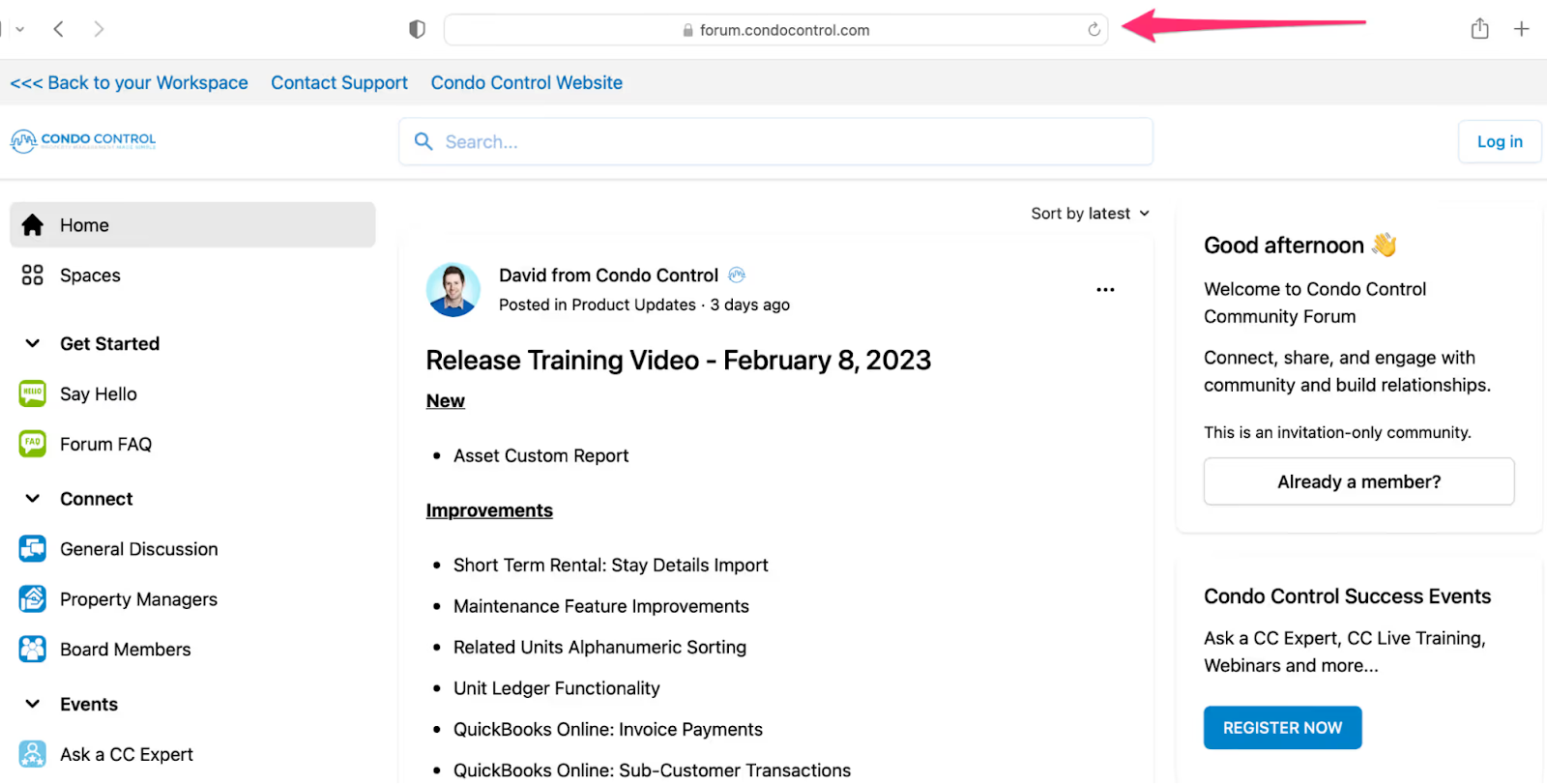
Brands can embed the entire forum, a specific post, or a particular space throughout their website and app. This is done by placing a block of code into your site's HTML editor. When the code is published, the forum becomes visible to visitors.
Standalone vs. embedded forums
A standalone forum exists completely separate from a company's website or app. It's hosted on its own domain or subdomain that users can access directly.
The distinction matters because they serve different purposes:
Standalone forums offer:
- Every content type in one place
- Design freedom without CMS constraints
- A full view of the content hierarchy, so navigation stays easy
Embedded forums offer:
- Access without leaving your site
- Your site's existing login, reused
- Placement inside relevant pages to increase engagement
Depending on your goals, either type can be excellent for sparking conversations and cultivating brand loyalty. In practice they complement each other, and plenty of brands run both.
Benefits of embedding a forum

Increased member satisfaction
No matter your industry or product purpose, embedding a forum increases user engagement. Data shows that customers who interact with forums feel seen (72%), feel heard (80%), provide solutions (90%), and ask questions (83%).
Embedded forums give users easy ways to engage: staying updated on conversations, providing support, offering feedback, and collaborating.
Improved user experience
Embedded forums let customers access features without navigating to a different site. This ensures frictionless experience. Users often don't need to log into an additional external account to post, which keeps the path from reading to contributing short.
Increased user retention
By offering users a direct line of communication to customers and employees, embedded forums naturally increase retention. Users have their voices heard and get questions answered quickly. By embedding posts into your site, answers users search for may already be published, which saves them the wait on a ticket.
Better community management
Community management involves moderating, engaging, monitoring, and measuring your forum regularly. An embedded forum makes this possible. Community managers can see common needs, wants, and concerns by reading discussion threads as they happen, and manage in real time.
Keep in mind that many members join online communities mainly to connect with people who have similar interests. And 42% of internet users in the US trust community sites more than social media. Your forum must be properly managed to create a positive community.
Increased brand awareness
An embedded forum creates space for your community to discuss products in an open and productive manner. This leads to positive long-term brand recognition. Data shows communities have a 47% positive impact on awareness and branding.
Embedding your forum front and center allows potential customers to see brand advocates in the open, which tells prospects more than any testimonial page.
Choosing the right forum platform
Selecting the right platform impacts the success of your embedded community. Consider these features:
Content moderation: Advanced tools that provide community-wide insights on all content, including full conversation history, profiles, and more.
User-friendly interface: Easy to navigate, short search time, encourages participation in active conversations.
Customizability: Full control over design: font, element sizes, email notifications, images, and more.
Integrations: Connect with tools you already use.
Profile features: Users can create and edit detailed personal profiles with contact information, bio, and images.
Private messaging: Users can message others privately for one-on-one discussions.
Single sign-on (SSO): Users log in using one set of credentials for multiple applications. Users already logged in are more likely to contribute.
Custom URLs for SEO: Create URLs using thread titles or edit URLs for search optimization.
Analytics: Monitor top-performing posts, top contributors, member growth, retention rate, activity over time, and more.
Embeddability: Ability to embed all or parts of your forum into your website or app.
How to create a forum website from scratch
If you don't have a website to embed into yet, or you want the forum to be the website, there are two honest routes in 2026.
The fastest is a hosted community platform. You pick the spaces, permissions, and design, apply your brand, and connect your domain, with no code and no servers involved. It's days of setup rather than weeks, and our comparison of 13 community platforms covers which tool fits which team.
The other route is self-hosting open source forum software like Discourse. Real control, real maintenance: you own updates, spam defense, and uptime. It suits developer-heavy communities with someone on the hook for infrastructure, and almost nobody else.
If you'd rather not start from a blank screen, Toggy Build does the first pass. It reads your website and content, then sets up a working Bettermode community on your domain, with spaces and starter posts already in place and your colors throughout. You can change every choice, and Build is free while it's in early access. See Toggy build one for your brand →
Integration options
There are different ways to integrate a forum into your website or app. Your choice depends on your brand and how you plan to use the forum.
Embed your entire forum
If you embed your entire forum, users see all components. You can publish in different layouts:
Default layout: Includes main navigation sidebar and header.
No-sidebar layout: Includes header but not navigation sidebar.
Basic layout: Only the content area, with no navigation sidebar or header.
Embed a space
You can show only a specific part of your forum on a webpage. For example, embed posts from your forum into a pricing page. Customization options include removing the header, hiding action buttons, or including like and follow buttons.
Embed a post
display relevant community posts on your product pages. You can select whether to display only the post, replies, or both.
Embedding in your web product
To embed a forum into your web product, use the <iframe> tag. Place the code in your HTML editor where you want the forum to appear.
Embedding in mobile apps
If you want to embed a forum into your mobile app, use WebView. This allows you to see and edit web pages inside your application.
The code depends on the programming language used to build your app:- Android apps: Kotlin or Java- Apple apps: Swift
Place specific URLs in a WebView or IFrame to embed either your entire community or part of it.
Customizing the forum
Individual customizations can be made so your embedded forum matches your website or app's branding. Common customizations include:
- Logo and community name
- Community colors
- Typography
- Header
- Sidebar
- Top navigation
You can also customize your forum to show only certain comments and threads to promote specific discussion topics.
Best practices for embedding a forum
Community guidelines and rules
Strict guidelines should be in place for users to follow. They improve communication, avoid conflict, and prevent chaos on your website.
Guidelines must be clear, concise, avoid jargon, and let members know:- What they can post- How to report violations- What questions they can ask- Policies on spam
Place guidelines where users can find them. Revisit and edit as needed.
Regular moderation
Healthy moderation keeps the forum friendly and safe. Since embedded forums are published on your website, regular moderation prevents bad comments from sitting in public, where they quietly cost you trust.
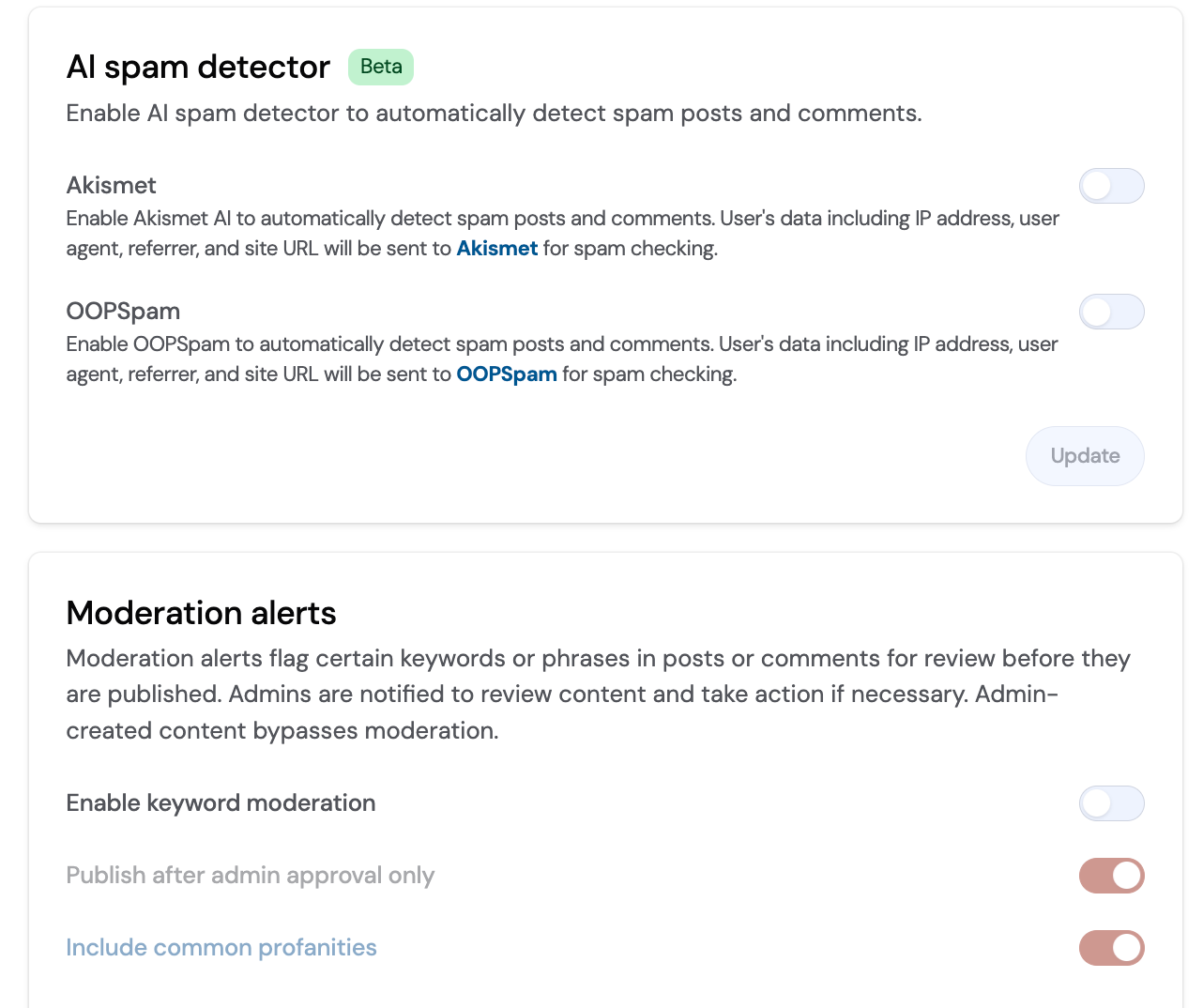
Sometimes moderators may need to ban members for inappropriate posts. Do this privately through a message, in a fair and unbiased manner.
Consider these qualities when choosing moderators:- How active they are in the community- Knowledge about your product and brand- Previous forum moderating experience
User feedback and engagement
Provide space for users to leave feedback about your product. Since your forum is embedded, users have likely already interacted with your brand and can provide truthful information. This feedback improves your product by highlighting needed changes.
People visit communities to discover what's new, and an embedded forum is a good stage for showing that feedback got heard and shipped.
Promoting user-generated content
Embedded forums let you reuse user-generated content across your website and app. User-generated content is powerful:- 90% of consumers say UGC influences their purchase decisions- 75% of users say UGC feels more authentic- 70% of the time people can distinguish brand-created content from UGC
A well-designed embedded forum encourages people to create UGC by discussing opinions and asking questions.
Getting started
Creating a forum and embedding it into your platform is one of the most effective ways to build an engaged online community. By integrating a forum directly into your website or app, you enhance user experience, boost SEO, and provide a centralized space for users to connect with your brand.
A well-embedded forum keeps existing members engaged and pulls in new users who arrive from search with a question it already answered.
Ready to add a forum to your website? Book a demo with Bettermode.
FAQs
How much does a forum website cost?
Forum costs range from free to thousands of dollars per year. Price varies depending on forum software, number of members, customization, hosting, integration options, and available features.
How do I add a forum on WordPress?
Install a plugin like bbPress or BuddyPress, customize the forum theme, and create forum pages. These plugins integrate with WordPress themes for user-friendly forums. Alternatively, embed a third-party forum using its embed code.
Can you add a forum to a Google site?
Yes. Embed a third-party forum platform using its embed code. Paste the code into the Embed option on your Google Site editor.
What's better: standalone or embedded forum?
Both serve different purposes and work best together. Standalone forums provide the full community experience with all features. Embedded forums bring specific content to relevant pages on your website, increasing engagement where users already are.
How do I create a forum website for free?
Free tiers exist on several platforms in our comparison, and open source software like Discourse is free if you host it yourself, which trades money for maintenance time. For a business community, judge free tiers by their ceilings: member caps, branding you can't remove, and whether the migration path out is real when you outgrow it.
What's the best forum website builder?
Depends what the forum is for. For a customer or member community that needs your brand and your domain, a community platform is the builder: hosted, no-code, and built around member systems from the start. For a hobby forum with a technical owner, self-hosted Discourse is the default. General site builders like Wix bolt forums on, and it shows.
TL;DR
- Two jobs, one decision: embed a forum into the site you have, or create a forum website from scratch. Both end with community and product under one roof.
- The fast route is a hosted community platform: your brand and domain, no code, live in days, then embed the whole forum, a space, or a single post into your existing site.
- Embedded forums keep members next to the product and hand you search-indexable pages from every answered thread.
- Self-hosting open source software is the control-and-maintenance route; general website builders treat forums as an afterthought.
- After launch the work is human: guidelines, fast answers, moderation, and recognizing the members who carry the space.